guide
Pros and Cons of Standing Desks for Web Developers
Welcome back to Developer's At Home, a blog series focused on ergonomics and the benefits of using a standing desk for web developers. In our previous blog posts, we introduced…
Devs At Home is a participant in the Amazon Services LLC Associates Program, an affiliate advertising program. We earn from qualifying purchases. This never affects what we recommend or what we say about it.
Standing desks reduce lower back pain and sedentary time for developers, but only if you alternate between sitting and standing every 30-60 minutes. Standing all day causes foot and leg fatigue that sitting all day does not, so the benefit comes from switching positions throughout your workday.
Key points
- Adjustable-height desks let you change position without stopping work, while fixed-height desks require a separate sitting workspace nearby.
- Desk converters sit on top of your existing desk and cost less than full standing desks, but they reduce usable desk depth by 12-18 inches.
- You will feel fatigue in your feet and calves within the first week of standing, which improves after two to three weeks as your body adapts.
- Typing accuracy drops slightly when walking on a treadmill desk at any speed, making them unsuitable for syntax-heavy work.
- Most developers stand for 20-40 minutes per hour after the novelty period ends, not the full workday.
- A standing desk does not fix posture problems caused by monitor height or keyboard placement — those require separate adjustments.
What happens to your body when you switch from sitting to standing all day
Your calves and feet will hurt first, usually by midafternoon of the first day. The soles of your feet start to ache, then your calves tighten, and by evening you'll feel it in your lower back. This is normal and it does not mean you are doing it wrong.
The discomfort comes from muscles that have not had to hold you upright for eight hours straight. When you sit, your chair carries most of your weight. Stand all day and your calves, feet and postural muscles take over that load without rest. They fatigue, then they protest.
Week one is the worst. Your feet will be sore when you wake up. You might notice your Achilles tendons feel tight, or that your knees ache in a way they did not before. Some developers report hip flexor soreness as their pelvis adjusts to a different angle. All of this fades as the muscles adapt, but it takes time.
By week two, the sharp pain in your feet usually softens into dull tiredness. Your calves stop cramping. You will still want to sit down by four in the afternoon, but the morning hours get easier. Most developers find they can stand comfortably for two or three hours at a stretch by the end of the second week.
Adaptation continues for about a month. After that, standing for half your workday feels unremarkable. Your feet no longer hurt at the end of a standing session, and the fatigue that made you want to collapse into your chair after lunch becomes a mild preference instead of a physical demand.
The adjustment period matters because it determines whether you will actually use a standing desk. If you expect to stand all day immediately and try to push through serious pain, you will stop using the desk within a week and it will become an expensive shelf. If you know your feet will hurt for ten days and plan for it, you can ramp up gradually and make it through to the part where standing feels normal.
None of this adaptation fixes poor posture. You can slouch standing just as easily as sitting, and a standing desk does not train you out of it. It changes the load on your muscles, not your habits.
How much time should you actually spend standing
Two hours of standing spread across your workday is the starting target, increasing to four hours once your legs adapt. Research on office workers shows health benefits from alternating postures rather than maximising standing time, and developers typing for eight or nine hours follow the same physiology. You are not training for a marathon. You are breaking up sitting.
Alternate every thirty to sixty minutes when you begin. Stand for half an hour, sit for forty-five. The exact ratio matters less than the habit of switching before discomfort sets in. After two or three weeks, many developers settle into hour-long blocks of each, or stand for two morning hours and two afternoon hours with sitting in between. Your lower back and shoulders will tell you what works.
Eight hours upright does not amplify the benefit — it trades sitting problems for standing problems. Prolonged standing fatigues the muscles that stabilise your knees and ankles, pools blood in your calves, and compresses the joints in your feet. Developers who stand all day report the same late-afternoon slump that all-day sitting produces, just with sore feet instead of a stiff neck. The goal is movement between postures, not replacing one static position with another.
How you transition matters as much as how long you stand. Raise the desk before you feel your hips tighten from sitting, not after. Lower it before your heels ache from standing. The point at which you notice discomfort is already past the point where changing position would have been useful. Set a timer if you will not remember on your own.
Four hours of standing per day, broken into intervals, improves energy and reduces lower back pain for most developers without introducing new problems. More than that, you are likely just shifting where it hurts.
Fixed-height vs adjustable-height standing desks
Fixed-height standing desks lock you into one position, while adjustable-height desks let you switch between sitting and standing through the day. That difference shapes everything else about how you work.
| Attribute | Fixed-height | Adjustable-height |
|---|---|---|
| Height range | One height only | Typically 22–48 inches |
| Sitting option | Requires separate chair at fixed height | Lowers for standard chair |
| Adjustment mechanism | None | Manual crank, electric motor or pneumatic |
| Shared workspace | Fits one person's elbow height | Adjusts for multiple users |
| Floor space | Same as adjustable | Same as fixed |
| Price difference | Less expensive | More expensive |
The no-adjustment part cuts both ways. Fixed-height standing desks cost less because there is no motor, no crank and no moving column. You build it once and you're done. But you also commit to standing whenever you use that desk, which means either standing your entire work day or keeping a separate sitting desk somewhere else in the room. Few people have space for both.
Elbow height matters more than you'd expect. Your forearms should rest roughly parallel to the floor when your hands are on the keyboard. Fixed desks work if the surface height matches your elbows when you're standing in shoes. Miss by two inches and your shoulders hike up or your wrists bend. There's no fix without sawing the legs or building a platform.
Adjustable-height standing desks handle the workflow most developers actually need: two hours standing in the morning, sitting after lunch, standing again mid-afternoon. You press a button or turn a crank and the desk moves. Electric models with memory presets drop to your sitting height in about fifteen seconds. Manual-crank desks take closer to a minute of continuous cranking, which gets old by day three.
Height adjustment also means the desk works for more than one person. If you share a workspace or move apartments, an adjustable desk adapts. Fixed-height standing desks are built for one body. Sell the house and you might sell the desk with it.
Neither type saves floor space. Both need the same footprint. The trade-off is money against flexibility, and flexibility usually wins unless you genuinely plan to stand all day, every day, forever.
Do desk converters work as well as full standing desks
Converters wobble more than dedicated standing desks, and the wobble worsens with every inch you raise the platform. Your keyboard and monitors ride on a platform that sits on top of your existing desk surface, so every keystroke transmits through two surfaces instead of one. External monitors amplify the problem — a 27-inch screen on a converter arm will sway visibly when you type at normal speed.
The instability matters most when you're debugging or reviewing code and shifting your hands between keyboard and mouse frequently. Each movement rocks the platform. Not much, but enough that you notice it after an hour. Heavier converters with wider bases reduce the sway, but they also take up more desk real estate and cost nearly as much as an entry-level adjustable frame.
Desk converters also shrink your working surface. The platform that holds your keyboard and monitors occupies roughly 30 by 20 inches of desk space, and nothing else fits there once the converter is in place. Your notebook, a tablet, a second keyboard for testing — all of that moves to the sides or off the desk entirely. If you work with reference materials open beside your monitor or test on multiple devices at once, a converter forces you to rearrange your workflow around its footprint.
Converters work fine for developers who type on a laptop or a single monitor and rarely move between sitting and standing. Raising and lowering the platform takes two hands and about ten seconds, which is just enough friction that you'll do it twice a day instead of five times. That might be enough. If you already own a solid desk and want to try standing without replacing the whole setup, a converter answers the question cheaply. Just expect to work around its limitations rather than forget they exist.
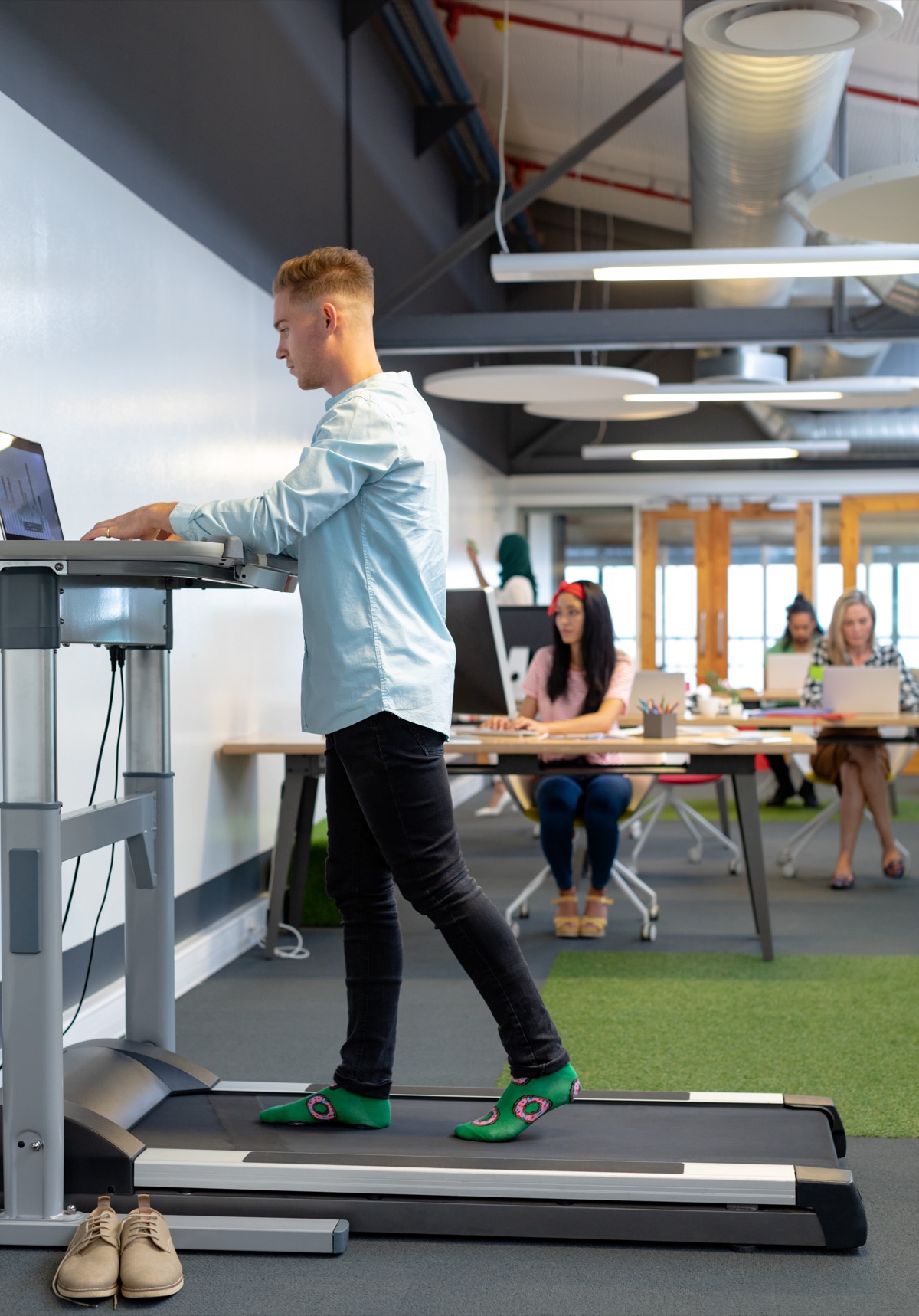
Can you type accurately on a treadmill desk
No, not at walking speeds above about 1.5 miles per hour. Walking while typing reduces accuracy for anything that requires precision: writing code, manipulating database queries, editing configuration files. Your hands bounce with each step, and that movement translates directly into missed keystrokes and cursor drift. The effect becomes noticeable almost immediately when you pick up the pace.
At 1 to 1.5 miles per hour, most developers can handle email, Slack messages, and reading documentation on a treadmill desk without major problems. Typing short responses works. Reviewing pull requests works. Light administrative tasks work. Anything beyond that runs into the accuracy wall.
Code is different. Variable names need exact spelling, bracket placement matters, and a single mistyped character breaks compilation. Walking at even a gentle pace introduces enough physical instability that your error rate climbs. You will catch yourself retyping the same line three times because your fingers keep landing half a key off.
The realistic use case for a treadmill desk is low-precision work during a small part of the day. Walk during meetings where you are mostly listening. Walk while reading long-form technical documentation. Walk during podcast episodes or video tutorials. Then stop the treadmill, stand still, and write the actual code. Alternating between walking and stationary standing gives you movement without sacrificing the accuracy detail work demands.
Treadmill desks cost significantly more than fixed-height or adjustable standing desks, and the typing trade-off limits when you can actually use the treadmill function. For most developers, the expense does not justify the narrow window of tasks where walking works. Standing still remains more practical for the majority of development work.
What a standing desk does not fix
Switching from sitting to standing changes where your weight sits, not whether your screen is too low or your keyboard is too far forward. Monitor height still matters. Your neck still bends if the top of the display is below eye level, whether you stand or sit. Wrist extension — the angle your hands make when they rest on a keyboard that sits too high — causes the same tendon strain at a standing desk as it does at a sitting one.
Shoulder tension from reaching forward does not disappear when you stand up. If your mouse is six inches past the edge of your desk, your shoulder holds that reach either way. The fatigue moves from your lower back to your feet and calves, but the upper body position that causes trapezius tightness stays identical unless you also move the screen closer and lower the input devices.
Standing desks do not correct typing posture. Developers who rest their wrists on the desk edge while typing will keep doing it standing up. The pressure point moves with you. Same for hunching forward to read small text, squinting at poorly scaled UI, or holding your head tilted because one monitor is higher than the other.
Glare and lighting problems persist. A standing desk does not reposition your window or your overhead light. If you get screen glare at 29 inches sitting, you will get it at 42 inches standing unless you also move the lamp or add a shade.
Breaking up long static positions helps, and alternating between sitting and standing does that. But the desk height is only one variable. You still need the monitor at the right distance and angle, the keyboard and mouse close enough that your elbows stay near your ribs, and enough space that you are not reaching or twisting. Fix those whether you sit, stand or switch between the two.
How to choose between desk types for your workspace
Start with how much floor space you control and whether you can drill holes. Fixed-height standing desks need a permanent commitment to standing-only work, which rules them out for rentals or shared offices where you cannot leave a desk at 42 inches forever. Adjustable-height desks solve that problem but demand roughly 24 by 30 inches of floor space for the base and clearance for the legs to move. Tight quarters? Desk converters work on top of your existing surface and pack flat when you move, though they reduce usable desk depth by about six inches when raised.
Ownership determines how much you should spend. Renting argues for a converter you can take with you rather than a full desk you will abandon or pay to move. Own the place and plan to stay three years or more, and an adjustable-height desk justifies the cost because you will use it daily for thousands of hours. Fixed-height desks made sense when adjustable mechanisms cost twice what they do now, but the price gap has narrowed enough that the adjustable version is worth it unless you are certain you will never sit.
Room layout limits your options in ways that are not obvious until you try to use the desk. Adjustable-height desks with crossbars between the legs do not fit over floor heating vents or around baseboards that stick out. Check the minimum height in the collapsed position if you sit cross-legged or need thigh clearance above 25 inches. Converters do not have that problem but create a new one: they block your monitor from tilting back if the converter platform sits too close to the wall.
Cables matter more than you expect. Adjustable desks move your laptop and monitor up and down by 16 inches or more, so power cables and USB lines need slack or a way to stay secured to the rising surface. Converters keep cables short. Treadmill desks need a power outlet for the motor and create a trip hazard with any cord running across the belt, which rules out certain room corners entirely.
Buy what fits your lease and your floor. Everything else is adjustable later.
Standing desk converters worth the trade-offs
Two converters handle a developer's setup without wobbling the monitors or eating all your desk space, though neither is as rigid as a full standing desk bolted to a fixed frame.
The Vari VariDesk Pro Plus 36 lifts both monitors and keyboard in one unit, which means you're not adjusting two separate platforms and wondering whether the height relationship is right. It uses a spring mechanism that lets you change height with one squeeze of the handles, fast enough that switching position actually happens instead of being deferred all afternoon. Check the weight capacity on the listing — two 27-inch monitors and a mechanical keyboard add up quickly, and overloading the springs makes the platform sag. Expect some lateral wobble when you type hard. Not much, but it's there.
The Ergotron WorkFit-T Standing Desk Converter splits the keyboard tray from the monitor platform, which gives you independent height control but also means two adjustments every time you stand. That separation matters if you prefer your monitors higher than the standard ratio allows, or if you share the desk with someone whose proportions differ from yours. The mechanism is smoother than most converters at this price range. Verify the footprint measurements before you order — the base is wide, and it will cover anything you keep at the back of your desk.
Both options leave your existing desk underneath, so you keep the drawers and the surface area. Both also add a second tier that collects dust and cable clutter. Plan for that.
Who should skip standing desks entirely
Skip a standing desk if you have plantar fasciitis, chronic venous insufficiency, or severe arthritis in your knees or hips. These conditions get worse with prolonged standing, and no amount of gradual adaptation will change that. The desk becomes an expensive liability.
Pregnancy past the second trimester makes standing work exhausting rather than energising, and the fatigue compounds faster than it does when you're not carrying extra weight in front of your centre of gravity. Sit. The desk will still be there in six months.
Developers recovering from lower limb surgery or stress fractures should wait until full medical clearance before adding standing hours to their day. Healing bone and tendon need rest, not sustained load. Even light standing counts as load.
If your office has a concrete floor and you cannot add a thick anti-fatigue mat, the standing desk will hurt more than it helps. Concrete transmits impact straight into your joints with no cushioning, and an hour on it feels like three on carpet or wood. The surface matters that much.
Finally, if you already walk or run daily and genuinely enjoy it, a standing desk might add nothing you need. You're already countering the metabolic cost of sitting, and your cardiovascular system is fine. The desk is for the rest of us.
Common questions
How long does it take to get used to a standing desk?
Your feet and calves will hurt for about the first week, with the worst discomfort in the first few days. By the end of the second week, most developers can stand comfortably for two or three hours at a stretch. Adaptation continues for about a month, after which standing for half your workday feels unremarkable.
Will a standing desk help with lower back pain?
Standing desks reduce lower back pain, but only if you alternate between sitting and standing every 30-60 minutes. Four hours of standing per day, broken into intervals, improves energy and reduces lower back pain for most developers. A standing desk does not fix posture problems caused by monitor height or keyboard placement — those require separate adjustments.
Do I need an anti-fatigue mat with a standing desk?
The article does not specify whether an anti-fatigue mat is required. It does state that if your office has a concrete floor and you cannot add a thick anti-fatigue mat, the standing desk will hurt more than it helps, because concrete transmits impact straight into your joints with no cushioning.
Can I use a standing desk if I have knee or hip problems?
Skip a standing desk if you have severe arthritis in your knees or hips. These conditions get worse with prolonged standing, and no amount of gradual adaptation will change that. Developers recovering from lower limb surgery or stress fractures should wait until full medical clearance before adding standing hours to their day.
How often should I switch between sitting and standing?
Alternate every thirty to sixty minutes when you begin. After two or three weeks, many developers settle into hour-long blocks of each, or stand for two morning hours and two afternoon hours with sitting in between. Raise the desk before you feel your hips tighten from sitting, not after, and lower it before your heels ache from standing.
Are treadmill desks loud enough to bother coworkers on calls?
The article does not address the noise level of treadmill desks or whether they would disturb coworkers during calls.
Do standing desks wobble when you type?
Desk converters wobble more than dedicated standing desks, and the wobble worsens with every inch you raise the platform. External monitors amplify the problem — a 27-inch screen on a converter arm will sway visibly when you type at normal speed. Full standing desks are more stable, though the article notes converters should expect some lateral wobble when typing hard.
What is the ideal height for a standing desk?
Your forearms should rest roughly parallel to the floor when your hands are on the keyboard. The article does not provide a specific height measurement, stating instead that adjustable-height desks typically range from 22–48 inches and that the correct height depends on your elbow height when standing in shoes.