
Blueprint
Drafting-table posture and a grid on everything.
Blueprint borrows from drafting studios, where the work surface tilts and the light is engineered rather than decorative. The unexpected benefit is neck posture — a tilted surface brings the work up towards you instead of asking your head to come down to it.
Start here
- 1 A tilting or adjustable work surface
- 2 A clamp-mount technical lamp
- 3 A monitor riser that sets true eye level
The collection
Devs At Home is a participant in the Amazon Services LLC Associates Program, an affiliate advertising program. We earn from qualifying purchases. This never affects what we recommend or what we say about it.
- Desk Setups
FLEXISPOT 55 inch Computer Desk Home Office Desk Workstation with Stor
1 ranked review, none we trust yet


 Monitor Risers
Amazon Basics Sturdy and Portable Ergonomic Laptop Stand for Desk
No reviewer we grade has covered this yet

 Monitor Risers
Nulaxy Fully Adjustable Laptop Stand for Desk
No reviewer we grade has covered this yet



Read first
- 101 3D Prints That Actually Improve a Developer Desk
Key points The prints worth making fall into four groups: cable management, monitor positioning, peripheral storage and ergonomic tweaks. VESA monitor arm…
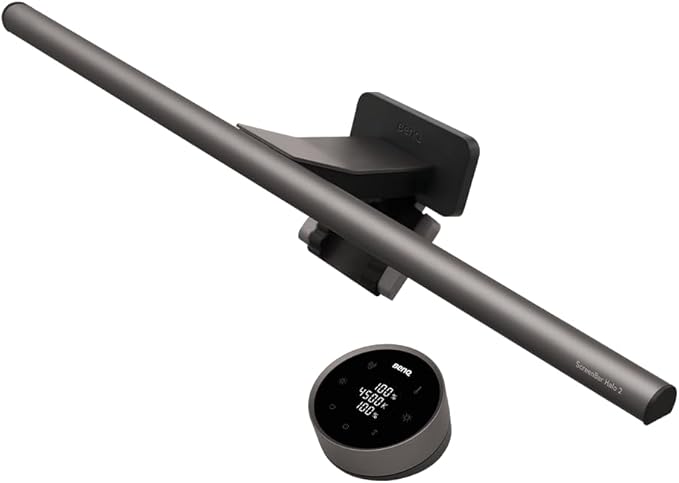
- BenQ ScreenBar vs Quntis: What the Extra Money Buys
The BenQ ScreenBar Halo 2 costs five times what the Quntis Computer Monitor Lamp does. Here's what that gap actually pays for.
- The Best Desk Mats, and the Size That Actually Fits Your Desk
A desk mat is for wrist comfort and mouse tracking, not decoration. Measure your keyboard-to-mouse span first, then choose the material.
- The Best Desk Upgrades Under $100
A monitor lamp, a foot rest and a trackball mouse fix more discomfort per dollar than anything else you can buy. Here's how to spend a hundred pounds three ways.
- The Best Ergonomic Mice for Programmers
Vertical mice rotate your forearm into a handshake position, which reduces pronation strain. They take two weeks to feel normal.
- The Best Laptop Stands: Screen Height Without a Monitor
A laptop stand raises the screen to eye level but makes typing worse. The right one depends on whether you're adding a keyboard.
- The Best Monitor Light Bars for Eye Strain and Late Nights
A light bar throws light onto your desk without reflecting off the screen. Here's what works, what doesn't, and which one to buy.
- The Best Split Keyboards for Fixing Your Shoulders
A split keyboard stops shoulder rounding and wrist bend. The adjustment matters more than the board.
- The Best Trackball Mice, From First Try to Full Convert
Thumb balls and finger balls demand different muscle memory. Here's which trackball suits your desk space, your precision needs and how long you're willing to adapt.
Questions people ask
- Does a tilted work surface help posture?
- For reading and writing, yes — angling the surface 10 to 20 degrees brings the work closer to perpendicular with your line of sight, which reduces how far the neck has to flex forward. For typing it does the opposite, so a tilting surface works best alongside a flat keyboard area rather than instead of one.
- What is the right height for a monitor riser?
- High enough that the top of the display sits at or just below seated eye level. Most people need less lift than they expect once the monitor is on a riser — a common error is stacking risers until the screen is above eye level, which tips the head back and loads the neck differently but no less.
Not quite it?
- Zen GardenNothing on the desk that does not earn its place.
- Battlestation, MannedThree monitors, one chair, zero apologies.
- Beige Box NostalgiaIt boots to a prompt and it sounds like 1994.
- Retro FitsMid-century furniture that happens to hold a laptop.
- Comic Books, Not Comic SansLoud on the walls, disciplined on the desk.
- CyberdeckExposed hardware, deliberate cabling, no wood anywhere.